Peoplelane vs Obsidian
An Obsidian alternative for 1:1 meeting notes
Obsidian is a flexible, local Markdown notebook you shape with links and plugins. Peoplelane adds a structured history for each person, open commitments and development context.
The short answer
Choose Obsidian when you want plain Markdown files, open formats and a system you design yourself with templates and plugins. Choose Peoplelane when recurring 1:1s need a durable record per person, visible follow-ups and goals without building your own system.
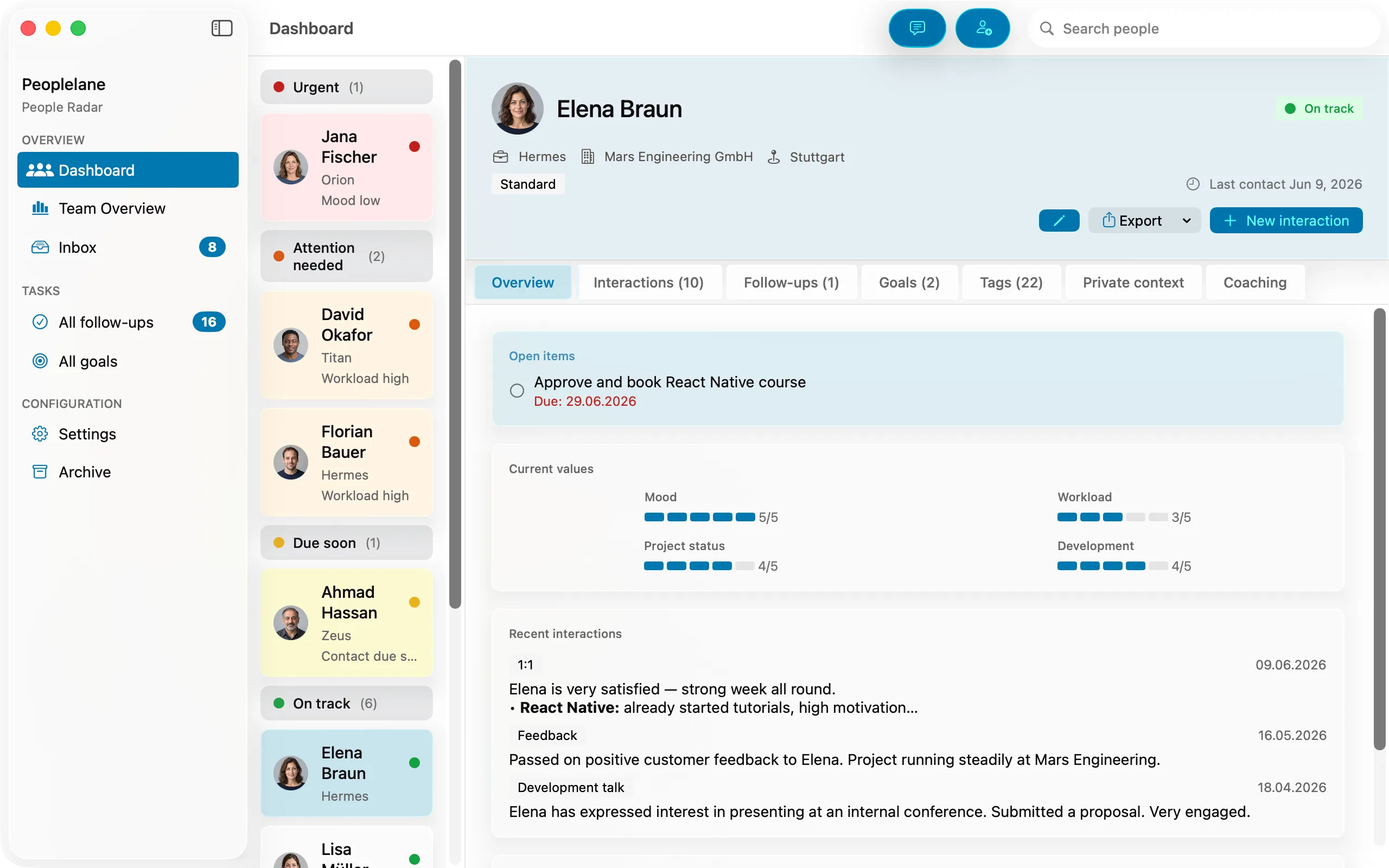
Peoplelane and Obsidian compared
Product details were checked against the official sources listed below on 27 October 2026. Prices and capabilities can change.
| Criterion | Obsidian | Peoplelane |
|---|---|---|
| Primary purpose | General personal knowledge base for linked notes, ideas and research | Purpose-built workspace for recurring 1:1 relationships |
| Storage and access | Plain Markdown files in a local vault folder; optional Obsidian Sync, iCloud or third-party sync | Workspace stored locally on the user’s Mac |
| Organisation | Folders, links, graph view and plugins; the manager designs the structure | Person-centred history with conversations, follow-ups and goals |
| Offline use | Local vaults are available offline | Core notes, search and follow-ups work offline |
| Follow-ups and goals | Possible with templates, tasks and community plugins | Dedicated open items and development goals |
| Proactive attention | Notes are passive unless plugins or conventions surface them | Highlights people needing attention, including overdue follow-ups and due syncs |
| Encryption | Obsidian Sync offers end-to-end encryption; Obsidian’s docs state it does not encrypt the local vault | Workspace stored locally on the Mac; device management and backups remain separate considerations |
| Platforms | macOS, Windows, Linux, iOS and Android | Mac running macOS 15.6 or later (Apple silicon or Intel) |
| Price checked 27 Oct 2026 | Free; Sync from $4/user/month billed annually; optional commercial licence $50/user/year, not required | Free notes and follow-ups for up to three people. Pro: unlimited people, career models and coaching, CHF 9/month or CHF 90/year incl. any VAT, billed through the App Store; regional prices may vary |
This is an independent comparison, not a claim of partnership or endorsement.
Two local-first tools with different jobs
Obsidian and Peoplelane share a starting point: notes live on your device and remain usable without a connection. Obsidian stores them as plain Markdown files in a vault and lets you shape everything else with links, templates and plugins.
Peoplelane starts with the person. Each conversation sits in a continuous history, while follow-ups and development goals remain visible between meetings. That reduces the organisational work for managers who run many recurring 1:1s.
Sync and policy still matter
Obsidian’s local vault is not encrypted by Obsidian, and syncing it is a separate choice: Obsidian Sync with end-to-end encryption by default, iCloud, Git or third-party services. Each route changes where copies of sensitive 1:1 notes end up.
Peoplelane keeps the workspace on your Mac and has no employer admin view. Local storage is not a universal exemption from policy: a managed Mac, backups and employment rules still matter.
Choose Obsidian if ...
- You want your notes as plain Markdown files in open formats you can open with any editor.
- You enjoy designing your own system with links, templates and plugins.
- You need access on Windows, Linux, iPhone, iPad or Android.
- Your 1:1 notes belong in a wider knowledge base alongside research, projects and ideas.
Choose Peoplelane if ...
- You currently keep one note or folder per team member and lose the long-term thread.
- You want every person’s history, open commitments and goals in one view.
- You prefer a purpose-built Mac app over maintaining templates, plugins and manual links.
- You want optional AI with a human review step before anything is saved.
Concrete use cases
- A manager with a folder of dated 1:1 notes in a vault can bring over the latest conversations, open commitments and current goals first, and leave the archive in Obsidian.
- Before a weekly 1:1, Peoplelane surfaces the latest conversation, open items and goals without running searches or queries across the vault.
- A leader can keep a wider knowledge base in Obsidian and private 1:1 preparation in Peoplelane, subject to company policy.
When neither is the right fit
- Obsidian is not a fit if you need a structured manager workflow without designing and maintaining it yourself.
- Peoplelane is not a fit if you need mobile access, plain Markdown files as the primary store or a general notebook for many unrelated topics.
Official sources
Obsidian · Obsidian pricing · Obsidian Sync · Obsidian help: Sync security and privacy · Obsidian help: Sync your notes across devices · Download Obsidian
Peoplelane details were checked against the current product information and live Peoplelane website. Product information is time-sensitive and should be rechecked before procurement.
Related Peoplelane guides
Peoplelane vs Apple Notes · Peoplelane vs Notion · Local-first 1:1 notes for Mac · How to keep 1:1 notes private
Decision questions
Is Peoplelane a replacement for Obsidian?
Only for the 1:1 workflow. Obsidian remains the more general tool for linked notes, research and cross-platform access. Peoplelane is narrower and adds person history, follow-ups and goals for leadership conversations.
Can I use Obsidian for private 1:1 notes?
Yes. Obsidian stores notes as local Markdown files and works offline. If you sync the vault, check which service holds the copies and follow your organisation’s policy. Obsidian Sync offers end-to-end encryption; the local vault itself is not encrypted by Obsidian.
Which is better for managers on Mac?
Obsidian is better for a flexible, plain-text knowledge base you design yourself. Peoplelane is better when you want a dedicated 1:1 and coaching workflow with less manual organisation.
A focused workspace for your next 1:1
Not yet available on the Mac App Store. Get an email when it launches.
Notify me at launch