Peoplelane vs Apple Notes
An Apple Notes alternative for 1:1 meetings
Apple Notes is a fast general notebook. Peoplelane adds a structured history for each person, open commitments and development context.
The short answer
Choose Apple Notes when a folder, tags and search are enough. Choose Peoplelane when recurring 1:1s need a durable record per person, visible follow-ups and goals without building your own system.
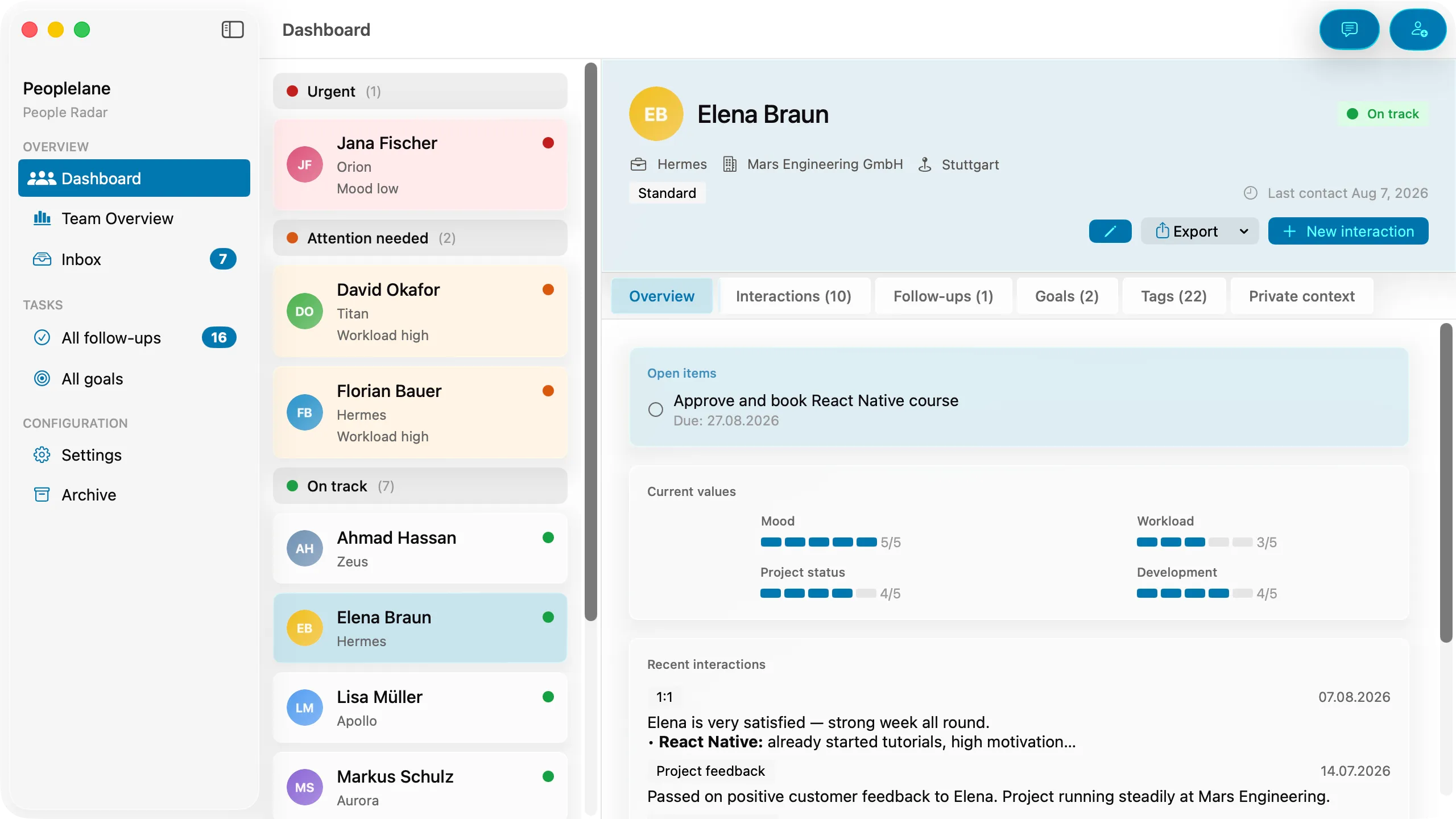
Peoplelane and Apple Notes compared
Product details were checked against the official sources listed below on 16 August 2026. Prices and capabilities can change.
| Criterion | Apple Notes | Peoplelane |
|---|---|---|
| Primary purpose | General notes, lists, attachments and collaboration | Purpose-built workspace for recurring 1:1 relationships |
| Storage and access | Notes can be stored in iCloud or on the Mac; iCloud syncs across Apple devices | Workspace stored locally on the user’s Mac |
| Organisation | Folders, subfolders, tags and search | Person-centred history with conversations, follow-ups and goals |
| Offline use | On-Mac notes work locally; iCloud notes depend on sync for other devices | Core notes, search and follow-ups work offline |
| Follow-ups and goals | Possible with checklists and manual conventions | Dedicated open items and development goals |
| Proactive attention | Notes and lists are passive unless reminders are configured | Highlights people needing attention, including overdue follow-ups and due syncs |
| Collaboration | Shared notes and folders are supported | Single-leader workspace, no shared editing |
| Platforms | Mac, iPhone, iPad and iCloud web access | Apple Silicon Mac running macOS 15 or later |
| Setup effort | Very low, but the manager designs the workflow | Low, with a focused leadership model already in place |
This is an independent comparison, not a claim of partnership or endorsement.
From scattered notes to a person-centred record
Apple Notes is deliberately broad. It is excellent for capturing a thought quickly, filing it in a folder and finding it again with search. The manager decides whether a note represents a person, a meeting, a project or something else.
Peoplelane starts with the person. Each conversation sits in a continuous history, while follow-ups and development goals remain visible between meetings. That reduces the organisational work for managers who run many recurring 1:1s.
Migration does not need to be a rewrite
Start with the notes you actually revisit. Bring over the latest conversations, unresolved commitments and current goals first. Leave archival material in Apple Notes until you know it is useful.
The important change is the retrieval model: one person, one history, and a separate active list. Do not copy sensitive information into a new system if your employer policy does not permit it.
Choose Apple Notes if ...
- You already use Apple devices and want the lowest-friction place for free-form notes.
- Folders, tags, checklists and search cover your workflow.
- You need shared notes or access from iPhone and iPad.
- You are happy to define your own person, date and follow-up conventions.
Choose Peoplelane if ...
- You currently keep one folder or note per team member and lose the long-term thread.
- You want every person’s history, open commitments and goals in one view.
- You want the core workflow to remain usable without a connection.
- You prefer a purpose-built Mac app over maintaining templates and manual links.
Concrete use cases
- A manager with one note per report can import the useful history, then separate dated conversations from active commitments.
- Before a weekly 1:1, Peoplelane surfaces the latest conversation, open items and goals without searching several notes.
- A team can keep a shared agenda in Apple Notes while the manager keeps private preparation in Peoplelane, subject to company policy.
When neither is the right fit
- Apple Notes is not a fit if you need a structured manager workflow without designing it yourself.
- Peoplelane is not a fit if you need mobile access, shared editing or a general notebook for many unrelated topics.
Official sources
Apple Notes User Guide for Mac · Search your notes on Mac · Folders in Notes on Mac
Peoplelane details were checked against the current product information and live Peoplelane website. Product information is time-sensitive and should be rechecked before procurement.
Related Peoplelane guides
Decision questions
Is Peoplelane a replacement for Apple Notes?
Only for the 1:1 workflow. Apple Notes remains the more general tool for lists, attachments and cross-device capture. Peoplelane is narrower and adds person history, follow-ups and goals for leadership conversations.
Can I use Apple Notes for private 1:1 notes?
You can store notes locally on a Mac or in iCloud, but the account and sharing model matter. Check which account owns the notes and follow your organisation’s policy. This comparison does not make a general claim about Apple’s privacy or encryption.
Which is better for managers on Mac?
Apple Notes is better for a simple, flexible notebook. Peoplelane is better when you want a dedicated 1:1 system with less manual organisation.
A focused workspace for your next 1:1
Not yet available on the Mac App Store. Get an email when it launches.
Notify me at launch